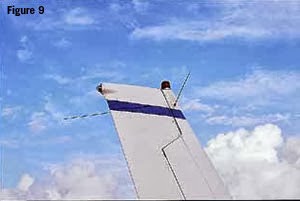
I have flown mostly in 172s that all have two communication
radios and two navigation radios. I have been accustomed to noting that there
were two communication radio antennas on top of the aircraft and what I thought
were two navigation radio antennas in a V-shape on the vertical stabilizer,
i.e. one antenna for each Nav radio. A few weeks back I was looking at a 152
and its antennas. The 152 had one comm radio and one nav radio. Correspondingly
it had only one comm antenna mounted on top of the aircraft but it still had
the two antennas on the vertical stabilizer in a V-shape. I originally thought
that maybe these antennas were installed in the case that an additional nav
radio might be installed. After doing some additional research I found that the
V shaped antenna is actually not two separate antennas but one antenna called a
dipole. The dipole is a specific design for an antenna that consists of two
identical elements that are joined in the center and feed a single radio or in
the case of the 172s with two nav radios the antenna feeds both nav radios.
Friday, October 18, 2013
Friday, October 11, 2013
What is missing?
As part of the pre-flight you open the access door in the engine cowling to check the oil quantity and quality. As you glance in to the engine compartment you see this picture. Is there something wrong?
Friday, October 4, 2013
FAR AIM 2014
The 2014 FAR AIM has been recently published. So what has changed? Honestly, not much. For the typical GA pilot, there were little if no changes in part 61 or part 91 since the 2013 version. Same can be said for the AIM section. The most intriguing question is what do you think of the cover picture? Old school paint job on the plane but some cool background.
Friday, September 27, 2013
Runway and taxiway signs
The AIM does a fairly good job of explaining the various runway signs and markings. The text in the AIM and the various pictures provide a good basis for learning about these important markings and signage but it is sometimes easier to learn about these by seeing them in context. I am sure we all have looked out the window on a commercial flight at the various airport signs and have gained a better perspective on how they are really used. As another source of learning, the link below is a video that shows actual runway signs and markings in real life context. The relevant part starts at about the 26:40 minutes into the video and continues until about 30:40.
Video
Video
Friday, September 20, 2013
A G1000 Flight Plan Tip
One of the things that seem to be a wasted opportunity is
having a better way to load a flight plan into the GPS. We have a lot of great
planning tools that we can use before we get into the plane to plan the route
of flight but once we are ready to go it always seemed a missed opportunity
that you couldn’t just load your pre-planned route directly into the GPS. It
takes several minutes to load this into the GPS and is somewhat tedious. I
friend of mine found an option to load a pre-planned route directly into a
G1000. FltPlan.com allows you to create a navigation log and then download it
on to a SD card in a format that the G1000 will recognize. I am not a user of
FltPlan.com but it seems like a fairly complete application. A few tips to get
this to work:
1. When you create an aircraft profile you have to select the option that it is a Garmin
2. There is a link at the bottom of the navigation page, in fine print, that you click on to download the flight plan
3. Once in the plane, load the SD card into the MFD upper slot, navigate to the Flight Plan catalog, scroll to an unused/free flight plan entry, then select import
Friday, September 13, 2013
Shadows on sectional charts
A tidbit from Air Safety Institute:
Did you know that mountains on the sectional charts are shaded to appear as though the sun is positioned in the northwest? According to NOAA, studies have shown that most people's visual perception has been conditioned to this view.
Friday, September 6, 2013
Noise abatement procedures at other airports
Often times when going to a new airport there will be a note
about noise abatement procedures. For example the AFD may have a note that says
“Noise abatement procedures in effect ctc arpt manager ….”. Calling the airport manager can be burdensome since they are not always there sitting at their phone waiting to answer your question. Sometimes noise
abatement procedures can be found online on the airport’s web site and are in
various formats. I ran across a new web site that is targeting to be a central
place where airports can document the noise abatement procedures and pilots can
have a single source to obtain them. Whispertrack, a firm based in Truckee, CA,
just released the first ever online content management and distribution
platform that allows airports to create, manage, centralize, publish, print,
and electronically distribute airport noise abatement procedures. Whispertrack
also claims to integrate with ForeFlight but I have been unable to find that
information. It seems like it is still growing as a number of airports, e.g. RHV, MRY are listed with the note that states: "The airport is currently updating their noise abatement procedures. Noise
abatement procedures will be available soon.". Nevertheless, this seems like a great direction. Check out https://whispertrack.com/
Subscribe to:
Posts (Atom)